



Let’s face it, bringing up internet safety can feel like walking a tightrope. We want our kids to be cautious without becoming paranoid about every online interaction, especially when it comes to internet strangers for kids. The key? Starting early and keeping things age-appropriate.
We’ve found that the best approach is treating it like any other safety conversation. You know how we teach kids not to talk to strangers at the park? Well, the internet is just another playground, except this one’s digital. Begin with simple concepts when they’re young, then layer in more complex ideas as they grow.
Here’s the thing about timing. We recommend having your first conversation when kids start using devices independently, usually around ages 5 to 7. Don’t wait for a “perfect moment” because it won’t come. Just weave it into everyday situations. Maybe when they’re playing their favorite game or watching videos, casually mention how some people online might not be who they say they are.
Understanding What Internet Strangers Really Mean

We need to help kids understand that Internet Strangers aren’t just the obvious creepy characters from cautionary tales. They can be anyone your child doesn’t know in real life. This includes other players in games, people commenting on videos, or even someone claiming to be another child their age.
The tricky part? Online strangers can seem really friendly and fun. They might share the same interests, play the same games, or like the same YouTubers. We’ve seen how predators often spend weeks or months building trust with children. They’re patient. They know exactly what kids want to hear.
That’s why we emphasize teaching kids that no matter how nice someone seems online, if they haven’t met them in person with a parent present, that person stays in the Internet Strangers category. Period. No exceptions.
Age-Appropriate Ways to Explain Online Dangers
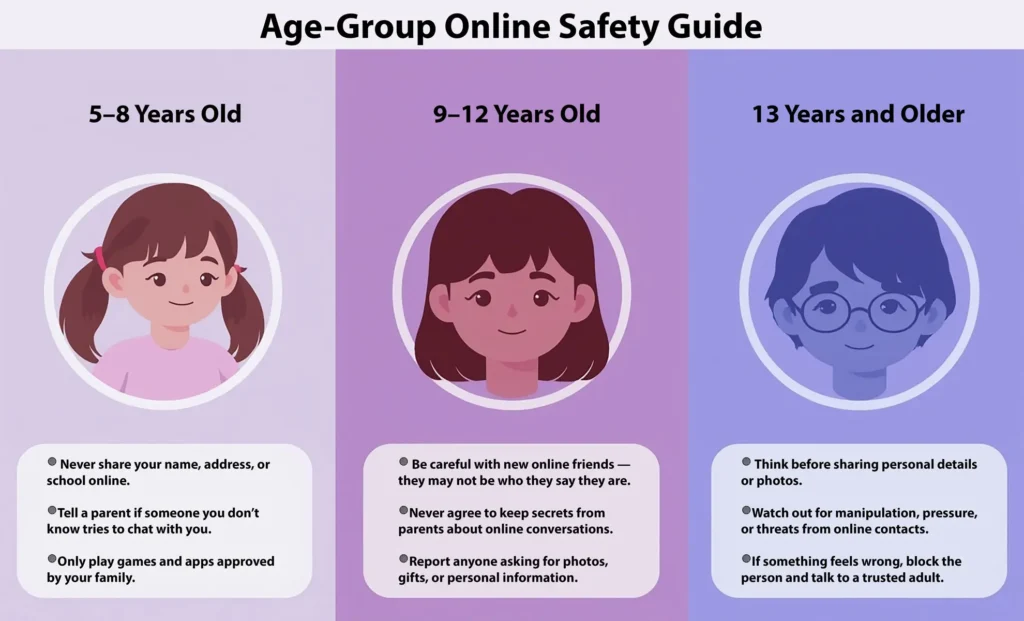
For Young Kids (5-8 years)
At this age, we keep it super simple. We tell them that just like they shouldn’t share personal information with strangers at the store, they shouldn’t share it online either. Use concrete examples they can understand.
We might say something like: “If someone you don’t know asks where you live or what school you go to, what do you do? You come tell mommy or daddy right away.” Kids this age respond well to clear, black-and-white rules. No sharing names, addresses, phone numbers, or photos. No meeting anyone from the internet. Simple as that.
For Tweens (9-12 years)
This is where things get more nuanced. Tweens are starting to crave independence, but they’re still learning judgment skills. We’ve noticed they respond better when we treat them as partners in their own safety rather than just laying down rules.
We explain that some adults pretend to be kids online to trick them. Yeah, it’s uncomfortable to discuss, but necessary. We talk about grooming tactics without using scary language. Something like: “If someone online starts asking you to keep secrets from us, or wants to send you gifts, or asks for photos, that’s a huge red flag.”
For Teens (13+)
Teenagers need real talk. We discuss specific scenarios they might encounter. What if someone they’ve been gaming with for months suggests meeting up? What if someone threatens to share embarrassing information unless they send more photos?
We acknowledge that they’re smart and capable while reinforcing that even adults can be fooled online. The conversation shifts from “don’t talk to strangers” to “here’s how to recognize manipulation and protect yourself.”
Creating Family Rules That Actually Work
You know what doesn’t work? Vague rules like “be careful online.” We need specific, actionable guidelines that everyone understands and can follow.
Start with the basics. All devices stay in common areas until a certain age. We check browsing history not because we don’t trust our kids, but because it’s our job to keep them safe from Internet Strangers and other online risks. Friend requests and new contacts need parental approval. These aren’t punishments; they’re safety measures, just like wearing seatbelts.
But here’s where we see many families struggle. Rules without explanation breed resentment. We always explain the “why” behind each rule. When kids understand that we’re protecting them from real dangers, not just being controlling, they’re more likely to cooperate.
We also believe in evolving rules. What works for a 7-year-old won’t work for a 14-year-old. Regular family meetings to discuss and adjust internet rules show kids we respect their growing maturity while still prioritizing their safety.
Building Trust While Maintaining Boundaries
This might be the hardest balance we face as parents. We want our kids to come to us if something goes wrong online, but we also need to set firm boundaries. The secret? Creating a judgment-free zone for honest conversations.
We tell our kids repeatedly: “If something weird or uncomfortable happens online, you can always tell us. Even if you broke a rule, your safety matters more than any consequence.” And we mean it. When they do come to us, we respond calmly, thank them for trusting us, and work together on solutions.
Sometimes kids worry about getting their online friends in trouble or losing internet privileges. We address these fears head-on. We explain that protecting them is our top priority, and we’ll always work to handle situations in a way that keeps them safe without unnecessary drama.
Trust also means respecting their privacy appropriately. As they get older, we shift from monitoring everything to spot-checks and open dialogue. We might say, “I’m not going to read every message you send your friends, but I need to know who you’re talking to and have access if something seems off.”
Teaching Kids to Recognize Red Flags
We can’t be looking over their shoulders 24/7, so we need to equip them with their own safety radar. We teach them specific warning signs that something’s not right. Federal Trade Commission – Kids Online Safety
Big red flags include anyone who wants to keep their friendship secret, asks for personal information, sends inappropriate messages or images, or tries to turn them against their parents. We role-play these scenarios. “What would you do if someone said, ‘Your parents just don’t understand our friendship?'” These practice runs build their confidence to handle real situations involving Internet Strangers or other unsafe contacts.
We also talk about gut feelings. If something feels weird or uncomfortable, it probably is. We tell them their instincts are valuable and they should always trust that little voice saying something’s off. Even if they can’t explain why, we want them to know it’s okay to block someone, leave a chat, or come talk to us.
What to Do When Something Goes Wrong
Despite our best efforts, sometimes kids encounter dangerous situations online. We need them to know exactly what to do, and more importantly, that it’s never their fault if an adult or any Internet Strangers try to manipulate them.
First step is always to stop communication immediately. Block the person, screenshot everything if possible, and come to a trusted adult. We emphasize that they won’t be in trouble, even if they broke rules leading up to the situation. Their safety trumps everything else.
We also prepare them for common manipulation tactics. Predators often threaten to share embarrassing photos or information if kids don’t comply with demands. We explain that giving in to these threats always makes things worse, never better. The brave thing is to ask for help, not try to handle it alone.
If something serious happens, we involve law enforcement. We save all evidence, report to the platform where contact occurred, and file reports with the National Center for Missing & Exploited Children’s CyberTipline. These aren’t overreactions; they’re appropriate responses to protect not just our child but others too.
Conclusion: Keeping the Conversation Going
Look, we know this isn’t a one-and-done conversation. Online safety is an ongoing dialogue that evolves as our kids grow and technology changes. We can’t predict every scenario they’ll face, but we can build a foundation of trust, awareness, and open communication — especially as they learn how to handle Internet Strangers and other online risks.
The goal isn’t to terrify our kids or make them paranoid about technology. We want them to enjoy the amazing resources and connections the internet offers while staying safe. By starting these conversations early, adjusting our approach as they mature, and maintaining open lines of communication, we give them tools to navigate the digital world confidently.
Remember, you’re not alone in this. Every parent is figuring it out as we go. The fact that you’re reading this, thinking about these issues, means you’re already on the right track. Keep talking, keep listening, and trust that your kids are more capable than you might think when we give them the right knowledge and support.
Helpful Resources
How Much Screen Time is Too Much? Age-by-Age Breakdown
A clear guide to recommended daily screen limits for kids at every age and how to apply them at home.
What is Digital Parenting and Why Every Parent Needs It
Learn the basics of digital parenting and how modern families can protect kids in today’s online world.
10 Hidden Online Dangers Every Parent Should Know About
A quick breakdown of the most common online threats kids face today and how parents can respond early.